
Use Cases
Embedded Power BI Reporting
How PTR can embed Power BI reports in a software vendor's application, using the application's own sign-in and showing each customer only their own data.

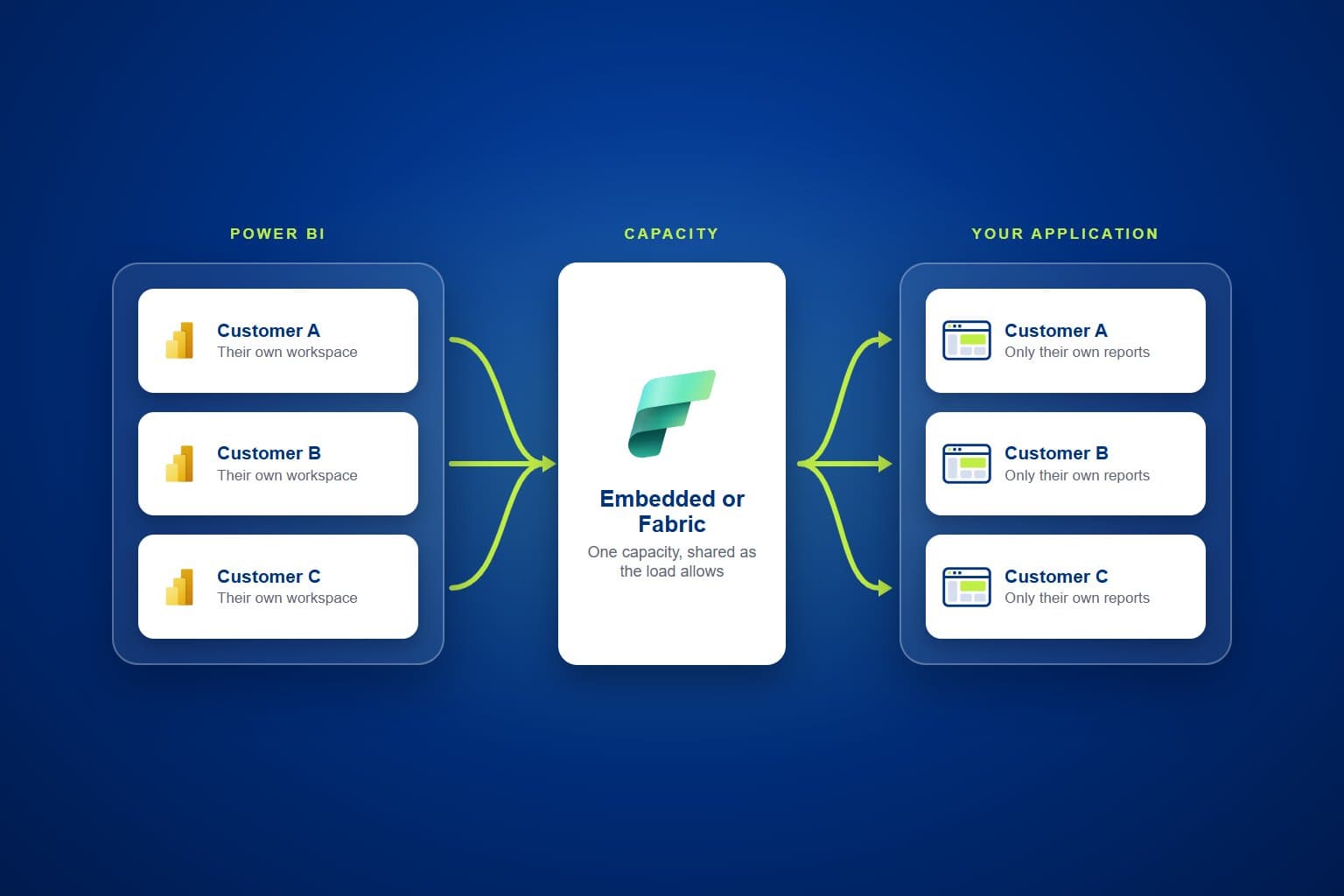
Your customers want to see their own data without leaving your application. PTR can embed Power BI reports in your product's own screens, so customers open them where they already work and see only their own data.
The Challenge: reports that live outside the product
Many software vendors build reporting by hand inside the application, or send customers to a separate tool to find it. Each new report is a development task, and every route outside the product means another sign-in and another place for customers to look.
Teams need to be able to:
- Show reports inside the application's own screens
- Use the application's own sign-in, with no separate login for customers
- Keep each customer's reports and data apart
- Give their own staff access across customers
What PTR can build: Power BI embedded in your application
We can embed Power BI reports in your application with the "App Owns Data" pattern. Your application signs its users in and asks Power BI for the report on their behalf, so customers never visit the Power BI service. Each report opens inside your screens, already filtered to the customer viewing it.
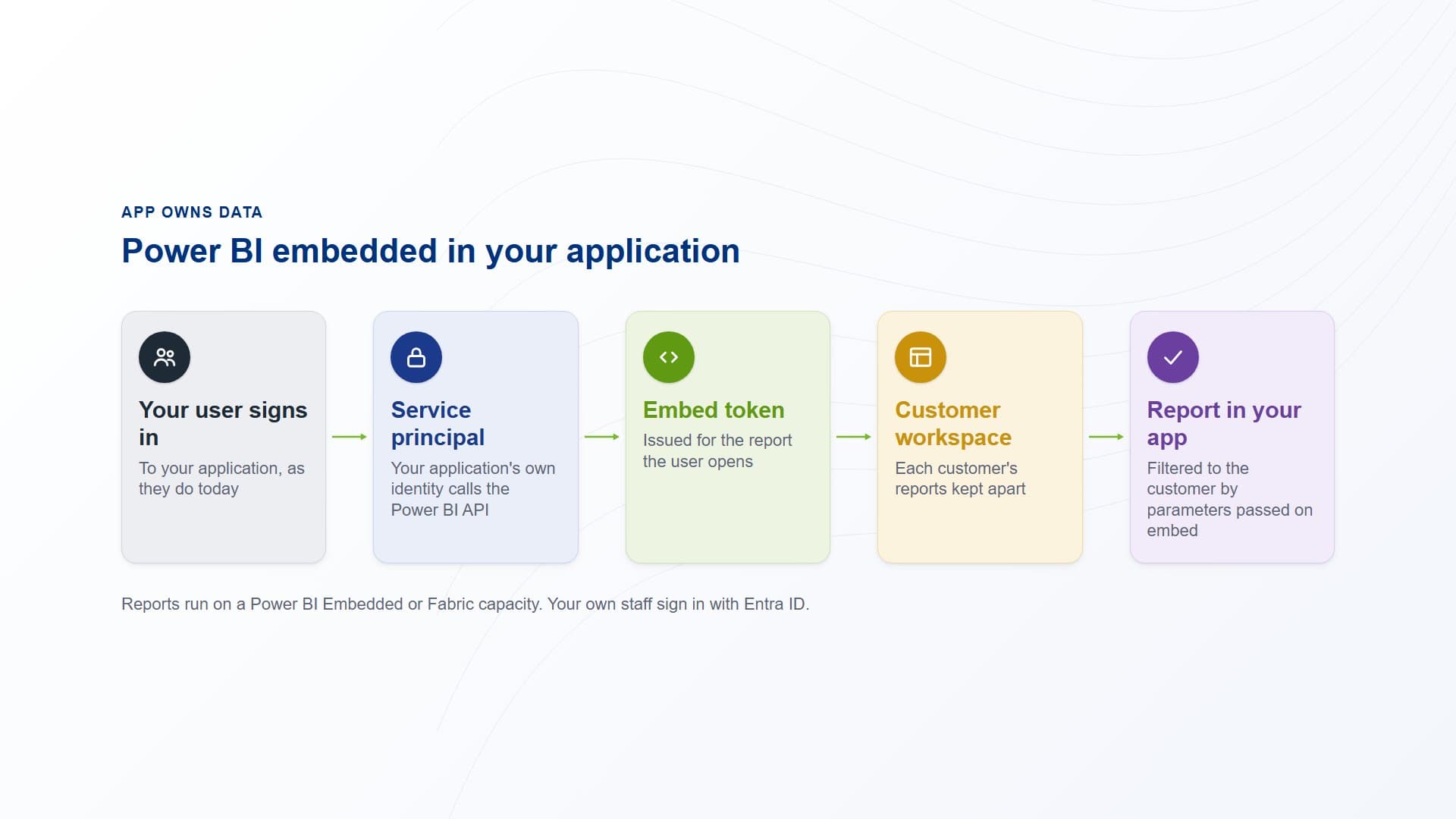
Your application signs the user in, requests an embed token and shows the report, filtered to that customer.
How PTR builds it: four parts of an embedded report
A workspace for each customer
Each customer's reports sit in their own Power BI workspace. This keeps one customer's content apart from another's and lets reports be published to each customer as they need.
Sign-in through your application
Your application authenticates its users as it does today. It then uses a service principal, an identity of its own, to call the Power BI API and request an embed token for the report the user opens.
Filtering on embed
When the application embeds a report, it passes parameters that filter it to the customer and user viewing it. The application decides what each user sees, using the rules it already holds.
Capacity sized to the load
Embedded reports run on a Power BI Embedded or Fabric capacity. Customers share capacity while their load allows, and more is added as usage grows. Your own staff sign in with Entra ID to work across workspaces.
What it gives your teams: reporting inside the product
- Reports where customers work:reports open inside your application, with no second sign-in and no separate tool to learn.
- Each customer kept apart:a workspace per customer and filtering on embed keep one customer's data out of another's reports.
- Access governed by your application:the application already knows who each user is, and it decides which reports and data they see.
- Capacity that follows demand:customers share capacity, and capacity is added when the load needs it rather than ahead of time.
Our view: the application should own the sign-in. Letting your application authenticate users and request embed tokens keeps reporting part of the product, rather than a second system your customers have to be given access to.
Make reporting part of your product
Stop building every report by hand, and stop sending customers to another tool to find it. Talk to us about embedding Power BI in your application. PTR provides consultancy, training and support in Power BI.
Call 0118 979 4000 or email info@ptr.co.uk.
Frequently Asked Questions
Couldn’t find the answer you were looking for? Feel free to reach out to us! Our team of experts is here to help.
Contact Us