
Blog Post
SQL Server – Password & Privilege Checking

SQL Queries to Check Passwords & Privilege Assignments
This article introduces a few SQL queries to gather information about user passwords and privileges and permissions assigned on SQL Server systems.
Checking for blank SQL Server user passwords
The sys.sql_logins view provides a password_hash column and the PWDCOMPARE function can be used to check for an empty string value.
The first WHERE clause checks for passwords with the format implemented since SQL Server 2000. The second WHERE clause checks for passwords with the format implemented prior to SQL Server 2000.
Checking for Common passwords
To check for common passwords simply place the password to test for as the first argument of the PWDCOMPARE function.
Checking for password matching login name
For this one simply use the name column from sys.sql_logins as the first argument to PWDCOMPARE.
Retrieving information about login/user privileges and permissions
The following views are available that will assist with retrieving information about privilege and permission assignments:
- sys.server_principals
- sys.database_principals
- sys.server_permissions
- sys.database_permissions
It can be quite long winded to check for a user's relative permissions and privileges so SQL Server provides a really useful function called fn_my_permissions which can help.
Server Privileges granted to a login
Database Privileges granted to a database user
Permissions on an object
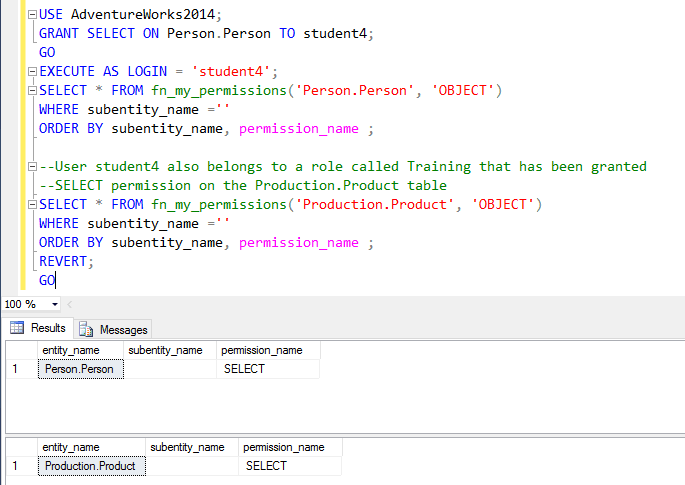
In the following example student4 has been granted SELECT privilege on a table called Person.Person, and a role called Training, which student4 belongs to, has been granted SELECT privilege on a table called Production.Product.
You can learn more about the audit and security of SQL Server from SQL Server Audit & Security Training Course.
MD
Mandy Doward
Managing Director
PTR’s owner and Managing Director is a Microsoft certified Business Intelligence (BI) Consultant, with over 35 years of experience working with data analytics and BI.

Frequently Asked Questions
Couldn’t find the answer you were looking for? Feel free to reach out to us! Our team of experts is here to help.
Contact Us