
Tech Tips
What FabCon Europe 2026 means for your Power BI and Fabric estate
FabCon Europe 2026 put Copilot, apps and agents on top of your semantic models and capacity. Here is what to review before switching them on, and two capacity checks for this week.

FabCon Europe wrapped up in Barcelona on 1 October, and the Fabric feature summary published alongside it has a reading time of just over two hours.
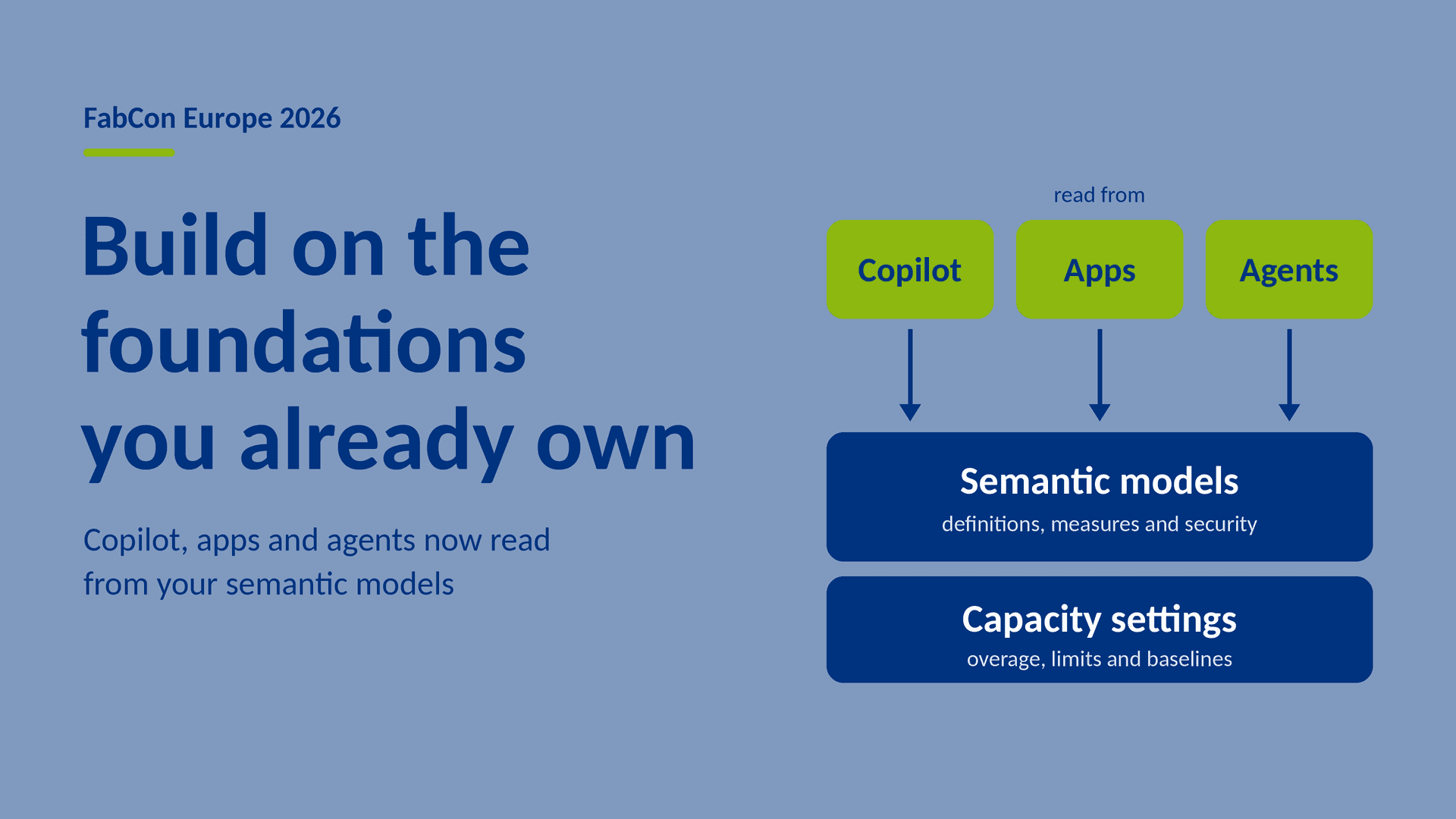
The announcements and most of the recaps since point the same way: Fabric is becoming the governed layer that Copilot, apps and agents all read from. Much of the new functionality builds on the semantic models and capacity settings organisations already have in place, so the best preparation for most teams starts with those existing foundations.
Your semantic model now has a much bigger audience
The headline was Fabric IQ in Microsoft Copilot, now generally available. Business definitions and measures from your Power BI semantic models feed into Copilot Chat and Copilot Cowork, and Microsoft says there's no extra token cost for Copilot users.
Someone in finance can now ask a question in Teams and get an answer from the same model your reports use. That makes the quality of the underlying model more important.
When a model fed only a handful of report pages, the developer knew which measure to use, even if it was called something like Sales_v2_FINAL. Copilot works from the model as it stands, so if two models in different workspaces calculate gross margin slightly differently, it will answer from whichever one it reaches, and sound just as sure either way.
When scoping reporting projects, the most valuable conversation is rarely about the DAX. It is agreeing who owns the definition of each measure. Copilot raises the cost of leaving that question unresolved.
Microsoft has built in a control for this: admins and model owners can stop specific semantic models being used by Copilot and agents. Before anything is switched on, review your core models, decide which are fit for an AI to read, and hold the rest back until the descriptions, measure names and row-level security (RLS) are in order. The new Microsoft 365 Copilot in Power BI preview also sits behind its own admin portal setting. It is off by default and separate from your existing Copilot toggle, so the two switches need managing separately.
Power BI starts building apps
Agentic app creation is coming to Power BI Desktop as a preview over the next few weeks. You describe the app in plain language, it builds on top of a semantic model, and each app gets its own Fabric SQL database (up to 1 GB) for writeback. It's included for Pro and Premium Per User at no extra cost, not just Fabric capacity customers.
Fabric Apps, which launched in June on the open source Rayfin SDK, also gained direct connections to warehouses, lakehouses, SQL databases and semantic models without copying the data.
For UK organisations, Fabric Apps (preview) isn't yet available in the UK South or UK West regions, and Microsoft hasn't said which regions agentic app creation will reach first. Because it is built on Fabric Apps, check your tenant's home region before planning around it, as UK tenants may not get it on day one.
Writeback is one of the most common requests we hear from clients, so this should help teams deliver simple workflow tools sooner. The main thing to plan for is app sprawl. When any Pro user can create an app and a database from a prompt, the number of apps can grow quickly, and agreeing who owns what is easier at the start than later.
Agree a few simple rules before the preview lands: who can create apps, which workspaces they live in, and which semantic models they can sit on.
The pipeline gets an agent
The data engineering agent (built on Microsoft's January acquisition of Osmos) is in preview. You set the outcome and the guardrails for migrations, schema work or ETL (extract, transform, load), and it plans, runs and validates the job on Fabric Spark, steered from Fabric, VS Code or GitHub Copilot.
As with any preview, start with a bounded pilot in a non-production workspace, with every change made through Git and a person reviewing the pull requests. If you still have Azure Data Factory or Synapse pipelines, the new migration assessment tooling is a lower-risk place to start, because it maps readiness without touching production.
SQLCon moves in next door
SQLCon Europe ran alongside FabCon for the first time, at the same venue. Database Hub (preview) brings SQL Server, Azure SQL, PostgreSQL, Cosmos DB and SQL database in Fabric into one view, alongside a set of Azure SQL Hyperscale updates for database teams to review.
The line between the database team and the BI team is getting thinner. If Fabric has mostly been a home for Power BI so far, get your data engineers and DBAs together to look at Database Hub and OneLake mirroring (BigQuery mirroring is now generally available). An hour is enough for a first look.
F0, overage, and two things to check this week
If you've ever tried to pin the scope down on a first Fabric project, you'll know the conversation usually comes back to the same question: which F SKU (capacity size) do we buy, and who signs off the monthly cost.
Microsoft's answer is an F0 SKU and on-demand billing, both coming to preview. F0 means no upfront capacity commitment, with payment only for the compute used, which moves the sizing decision to the end of a project once you have real numbers. For smaller organisations, it lowers the barrier to entry. Pricing wasn't published in Barcelona, so keep any reserved capacity in place until it is.
The one to review now is capacity overage (preview). When a capacity hits its limit, overage buys extra compute instead of throttling your users, billed at three times the pay-as-you-go rate up to a 24-hour limit you set. It's on by default for newly created capacities (existing ones stay off unless someone has turned it on), so an inefficient measure or a long-running notebook is paid for rather than throttled. That suits production, where uptime matters most. On development capacities, throttling is usually the better safety net.
That makes two checks this week. First, check whether overage is on for each of your capacities and what the limit is set to. Second, update the Capacity Metrics App (the preview adds hourly capacity unit (CU) consumption and a two-week view of item issues) to set a baseline before F0 pricing is published.
If you'd like help deciding which of this belongs on your roadmap, whether that's auditing your semantic models before Copilot is switched on or training your team on Fabric, get in touch with us at PTR.
BV
Brett Valentine-Dunn
Senior Business Intelligence Consultant
Brett has been working in data and analytics for a decade, and has helped many SMEs transform their businesses by harnessing the power of data and business intelligence.
Frequently Asked Questions
Couldn’t find the answer you were looking for? Feel free to reach out to us! Our team of experts is here to help.
Contact Us